Who actually showed up.
The list of names you built in March is not the list of people who walked in. No-shows are the most expensive line in an event budget and the one nobody records.
Event attendance and budget management for companies
Convenio is where companies plan the trade shows and conferences their people attend — who goes, what has to be done before it, and what it cost against the budget. For whoever runs the events, it also does the chasing: reminders go out on their own, and last year's edition becomes this year's plan.
Set up your first event in an afternoon. No installation, nothing to connect to your existing systems.

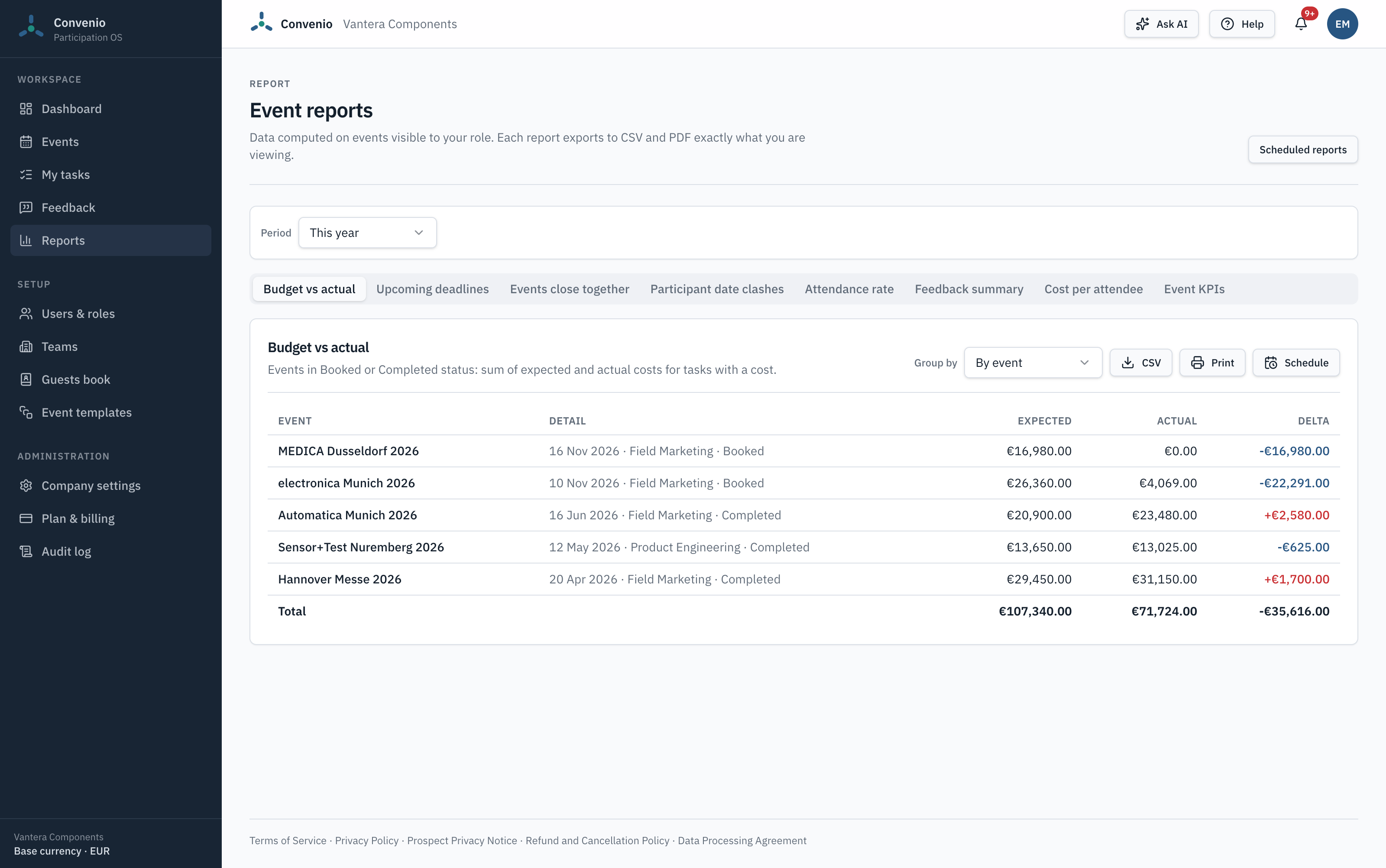
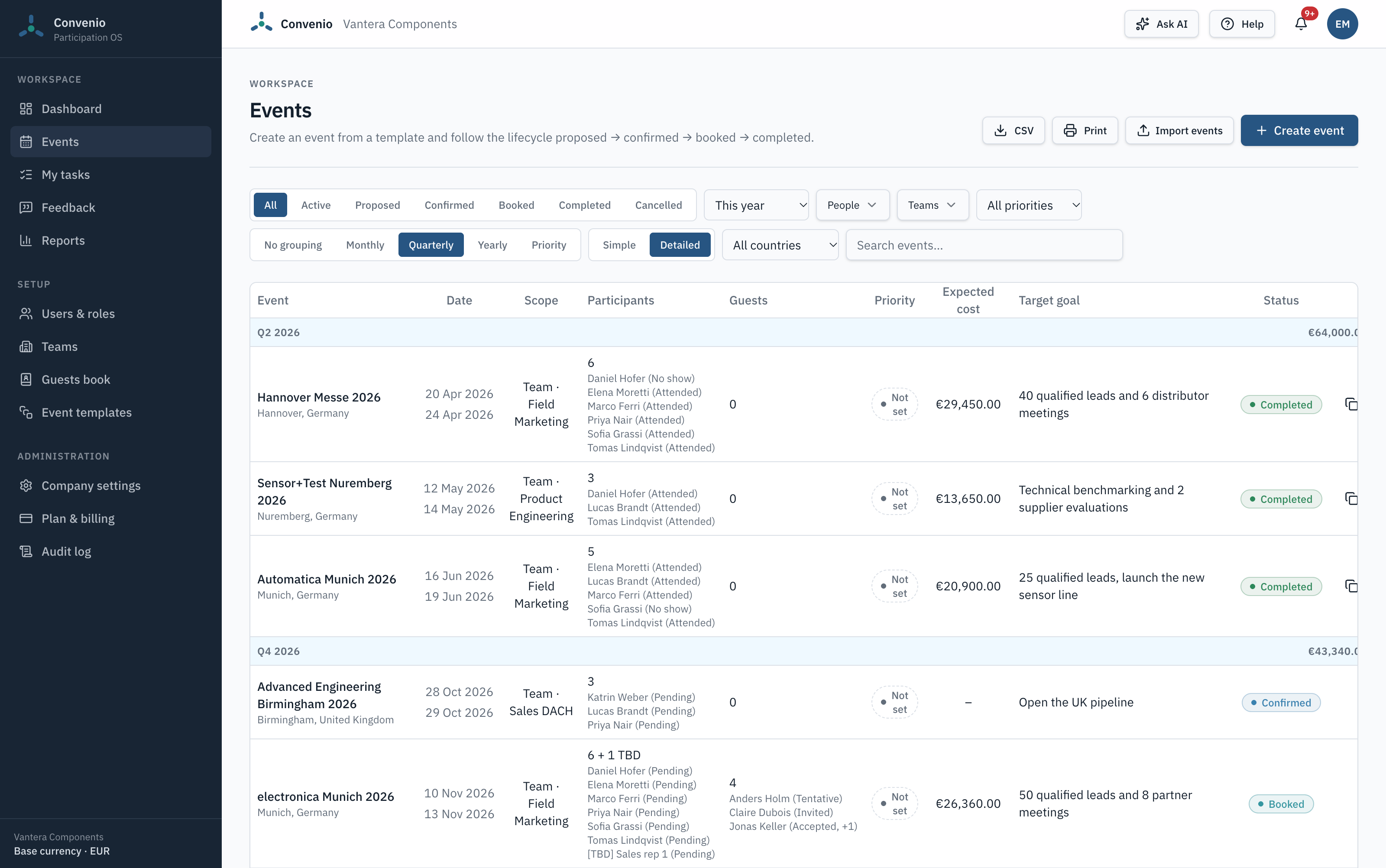
A trade show from plan to report: who goes, what has to be done, what it costs against the budget, the guests you invite, and what came back.
The list of names you built in March is not the list of people who walked in. No-shows are the most expensive line in an event budget and the one nobody records.
Registration, travel, accommodation, stand or sponsorship costs arrive over three months, from four different people, in two different currencies. By the time they are all in, nobody goes back to compare them with the budget.
Next year's decision gets made on whoever remembers the event most vividly, because there is no record of what the last one returned.
Someone sends the reminders, collects the hotel bookings, asks for the invoices and rebuilds the file for next year. That work never shows up in the budget, and it is usually one person's whole week before every event.
One person at one European conference typically costs €1,300–3,500 once you add the ticket, the travel and the hotel. Convenio Start costs €490 a year.
One wasted registration pays for the software for two to seven years.
Whether your people stand behind a booth or speak on a panel, the questions are the same: who goes, what has to be done before it, what it cost, and whether it was worth it.
Sales and technical teams on the stand, samples to ship, badges to order, customers to meet at the booth. Convenio keeps the people, the deadlines and the stand costs of every show in one place, and tells you what each one cost per attendee.
Law, accounting and consulting firms sending partners to conferences around the world. The ticket is the smallest cost: the real one is days of senior time away from client work. Convenio shows who represents the firm where, keeps speaking and sponsorship deadlines on track, and records the clients you host at the dinners around them.
Most of the work around an event isn't the event. It's the reminders, the bookings, the invoices and the file you rebuild every year. Convenio takes that part off whoever runs the events.
Convenio reminds each person of their tasks before the deadline, asks for feedback after the event, and tells the owner when an event is ready to close. No more "just a reminder" emails.
Clone an event with its tasks and people, and each person's actual cost becomes their new budget. For the events that come back every year, generate the next editions in one go.
Add TBD placeholders with their tasks and budget, then assign the real person when you know. Nothing gets rebuilt, and Convenio reminds you before the event if a seat is still open.
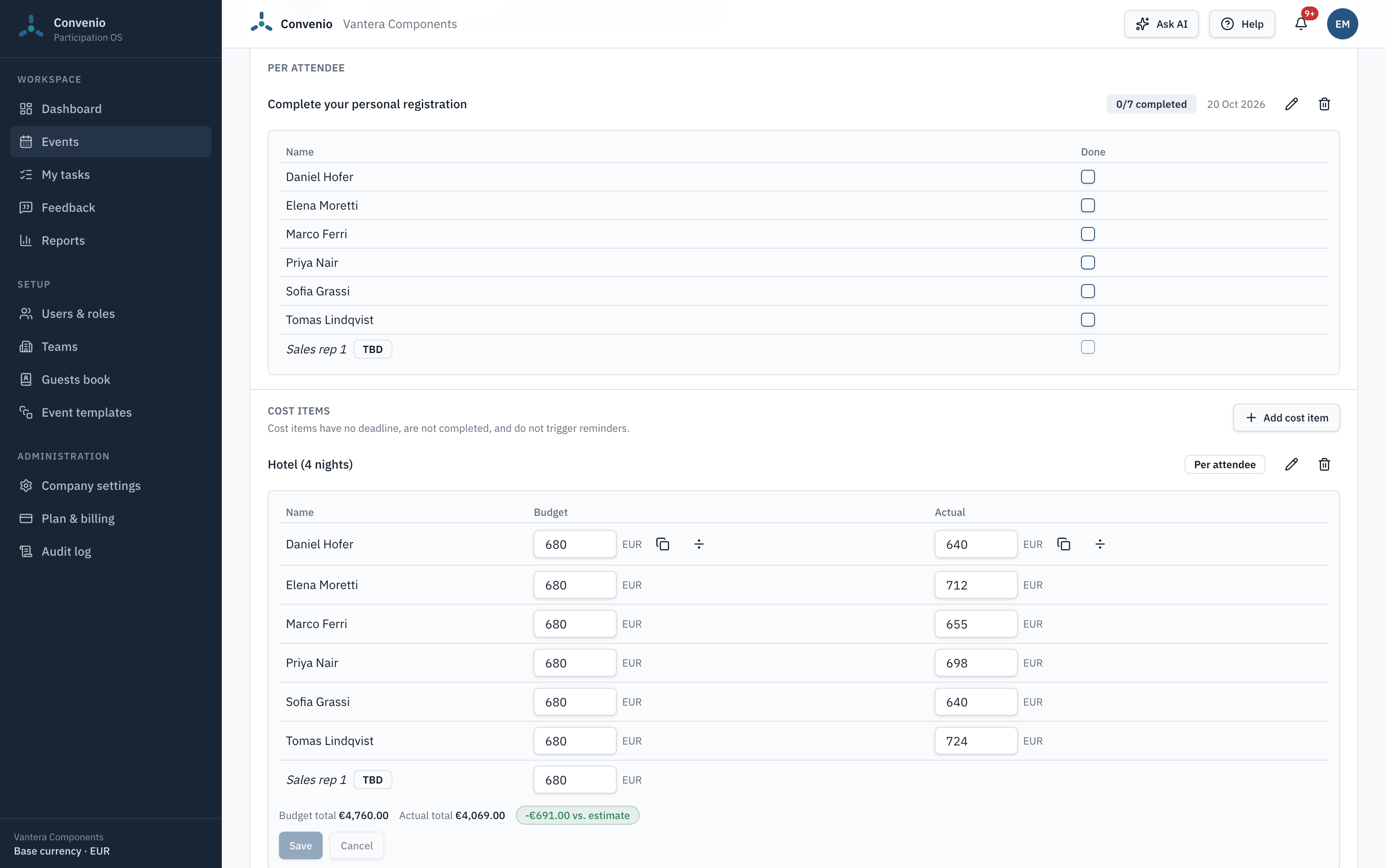
Record the hotel or ticket for each attendee, copy one amount to everyone, or enter the invoice total and split it evenly. The totals and the difference from budget are worked out for you.
The clients, partners and speakers you invite sit next to your own people, with their invitation status and whether they came. From Start, a shared guests book keeps their details for the next event.
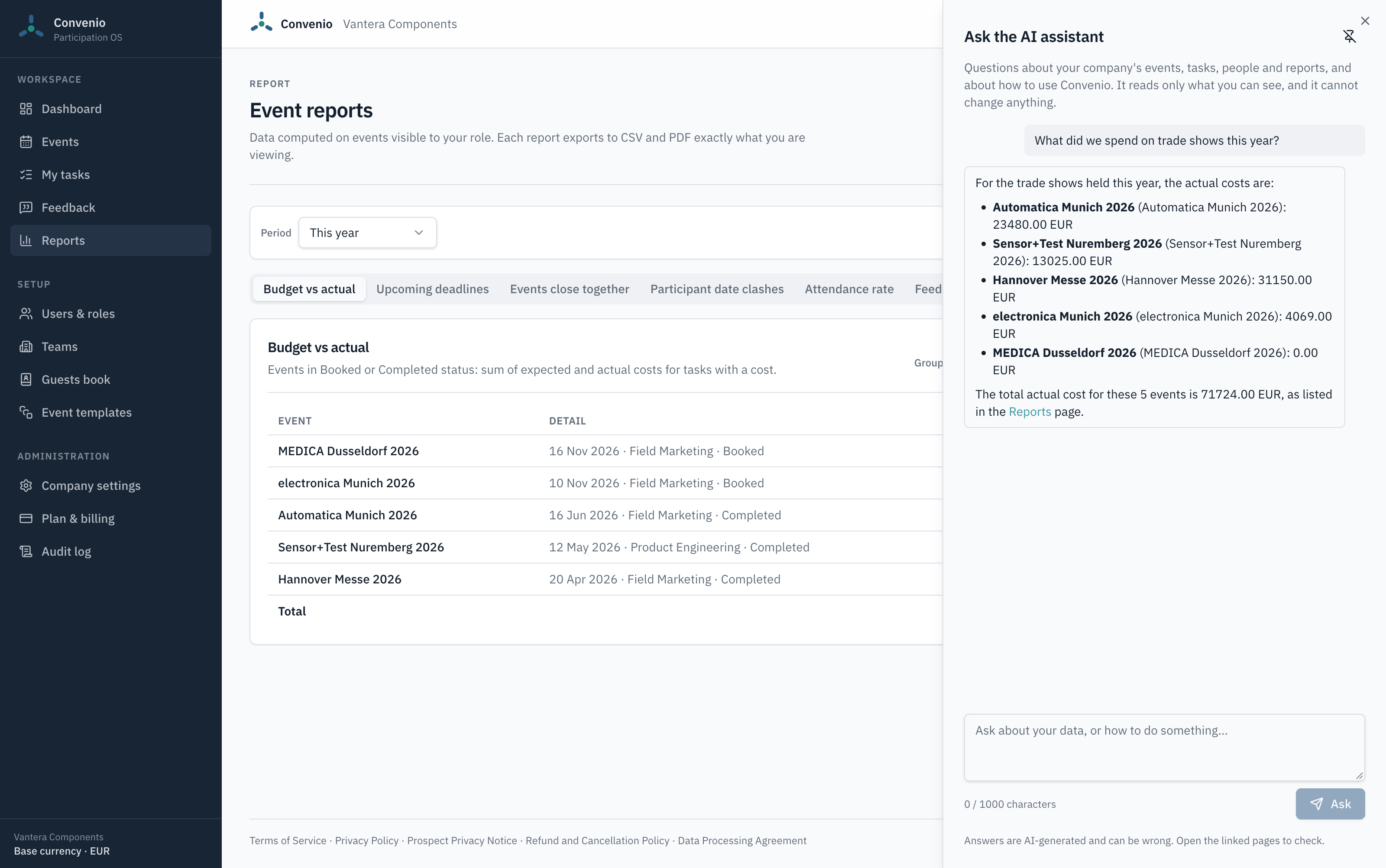
"Who is going to Hannover Messe?" "What did Marco's trips cost this year?" Ask in plain words and get the answer with a link to the page.
On Growth and Scale
"What did we spend on events this year?" "Who is going to Hannover Messe, and who to the conference in Lisbon?" "What did Marco's trips cost us this year?" Type the question in plain words. Convenio answers from your company's data, with a link to the page that shows it.
Events, participants, tasks, costs, attendance and reports — nothing else. If nothing in Convenio covers the question, it says so instead of guessing.
The assistant follows the same permissions as the app. A participant can't learn a cost they couldn't open themselves, and only admins and team leads get answers from reports.
Totals, variances and counts are calculated by Convenio and reported as they are. The model never adds them up.
Ask how to clone an event or schedule a report, and it answers from the help articles, with a link to the article.
It reads; it doesn't change anything. Answers are AI-generated and can be wrong — every answer links to the page where you can check it.
Events move through Proposed, Confirmed, Booked and Completed, so a plan that is still an idea never gets counted as a commitment. Set a priority on each one, reuse templates, and clone last year's edition for the events that come back.
Who was invited, who attended, and a recorded reason for every no-show — for your own people and for the clients and partners you invite. The gap between the two lists is the number most companies never see.
Set an expected cost on any task — or per person, for hotels and tickets — enter the actual one when the invoice lands, and read the difference per event, per team or per quarter — without rebuilding a pivot table.
Eight built-in reports — budget vs actual, cost per attendee, attendance rate, feedback summary, event KPIs, upcoming deadlines and two calendar-conflict checks. Every one of them exports to CSV and PDF exactly what you are looking at.
Not always. If one person organises two events a year and goes to both, a spreadsheet is genuinely fine — and we will give you a good one. Here is where the file stops working.
| Comparison | Spreadsheet | Convenio |
|---|---|---|
| Two people editing on the same day | One of the two versions wins | Everyone works on the same data |
| Who attended vs who was invited | Recorded if someone remembers to | Recorded per person, with no-show reasons |
| Costs in more than one currency | Converted by hand, once | Recorded in the currency paid, converted in every report at the current rate |
| Chasing the pre-event to-do list | Manual emails | Assigned tasks with deadlines and automatic reminders |
| Planning before you know who goes | A row called "someone from sales" | TBD placeholders that keep their tasks and budget until you name the person |
| Splitting a hotel invoice across five people | A calculator and a formula | Enter the total and split it across the attendees |
| Keeping track of the clients you invited | A second spreadsheet | Guests on the same event, with invitation status and attendance |
| Comparing this year with last year | Open both files | One report, filtered by period |
| Someone leaves the company | The file leaves with them | The data stays with the company |
| Answering a quick question about spend | Find the right file, then build a pivot table | Ask the assistant, get the number and a link to the report (Growth and Scale) |
| What it costs | Nothing | From $0 to $539 a month |
Priced per company, not per user. Everyone in your organisation can use it.
These are our launch prices. They will go up as Convenio grows — the price you sign up at is yours for 12 months.
Free
No credit card needed
$49 / month, billed annually
$590 billed once a year
$3.27 per user per month, at 15 users
Save $118.00 a year compared with paying monthly
$149 / month, billed annually
$1,790 billed once a year
$2.98 per user per month, at 50 users
Save $358.00 a year compared with paying monthly
$449 / month, billed annually
$5,390 billed once a year
$2.25 per user per month, at 200 users
Save $1,078.00 a year compared with paying monthly
Paid once a year, and your price stays the same for the full 12 months.
What a credit is worth. One credit is roughly 75 questions to the assistant — about 1,500 a month on Growth and 3,750 on Scale. It is an average measured in testing, not a guarantee: longer questions and longer answers cost more. The allowance is per company, not per user, and it resets at the start of every month.
All prices exclude VAT, which is calculated at checkout. Change or cancel your plan at any time. Existing customers keep their price for 12 months if the list price changes.
If none of the four plans fits — more users, more events, or a limit that sits between two of them — we can put together a plan for your company. Start on the free plan, then email us and we will set it up on your account.
The Trade Show Budget & Attendance Tracker is the file we would build if we had to do this in Excel: budget vs actual per event, an attendee list, a pre-show checklist and a cost-per-attendee calculation. It is free, it works, and it is yours whether or not you ever open Convenio.
Free trade show budget template and conference attendance tracker, downloadable as an Excel spreadsheet. Track expected versus actual event budget, attendee lists and no-shows, and cost per attendee for any trade show or conference.